
Quick Answer
To prepare for Odoo data migration, clean your existing customer, product, and financial data; remove duplicates; standardize records; decide what actually needs to be migrated versus archived; document your business workflows; and work with an experienced implementation partner who validates every dataset through User Acceptance Testing before go-live.
Migrating to a new ERP system is more than moving data from one piece of software to another. A successful Odoo implementation depends on accurate data, careful planning, and the right implementation partner. Many ERP projects run over budget or frustrate users simply because businesses underestimate how much preparation good data migration actually needs.
This guide walks through exactly what to prepare before implementing Odoo, the mistakes that most commonly derail Malaysian SME projects, and how to evaluate an implementation partner before you sign a contract.
Why Data Migration Matters
Your ERP system is only as reliable as the data inside it. Poor-quality data doesn't disappear during migration — it simply moves with you, and it affects every part of daily operations:
- Sales orders and quotations
- Customer and supplier records
- Inventory balances and warehouse accuracy
- Product pricing and costing
- Accounting reports and tax filings
- Manufacturing planning and purchase history
Moving incorrect or incomplete data into Odoo simply transfers your existing problems into a new, more visible system — which is often worse than the problem you started with.
The Data Migration Journey
A well-run migration follows a predictable sequence. Skipping a stage — especially validation — is the most common reason implementations slip in timeline.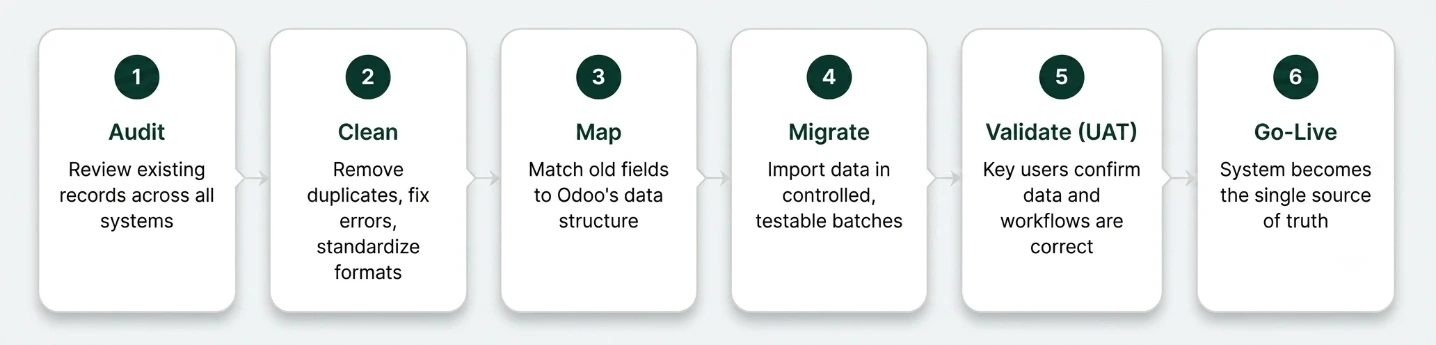
What Should Be Prepared Before Odoo Implementation?
1. Customer & Supplier Master Data
Review your customer and supplier records for duplicate companies and contacts, missing email addresses, invalid phone numbers, incorrect payment terms, and outdated records. Clean master data improves both reporting accuracy and day-to-day operations.
2. Product Master Data
Before migration, product information should be complete: product code (SKU), name, unit of measure, category, selling price, cost price, barcode, vendor information, applicable taxes, and product type. Product images are optional but recommended.
3. Inventory Data
Verify current stock quantity, warehouse location, serial or batch numbers, expiry dates, and opening inventory valuation. A physical stock count immediately before migration is strongly recommended.
4. Financial Data
Prepare your chart of accounts, outstanding customer invoices, supplier bills, bank balances, fixed assets, opening balances, and tax configuration. Consult your accountant to decide how much historical financial data actually needs to be migrated.
5. Employee Information
If you're implementing HR modules, prepare employee records, departments, job positions, leave balances, and attendance data where applicable.
6. Manufacturing Data
Manufacturers should prepare bills of materials (BOM), work centers, routing, production operations, machine data, and quality checklists ahead of go-live.
Common Data Migration Mistakes
Most implementation delays trace back to a small set of avoidable issues:
📃 Duplicate Records
Duplicate customers and products create reporting errors and confuse users after go-live.
📦Missing Product Codes
Incomplete product data breaks inventory tracking and purchase workflows.
🗳️Incorrect Opening Stock
Wrong opening balances distort inventory valuation from day one.
❌No Testing Before Go-Live
Skipping UAT means issues are discovered by users in production, not before it.
❗Inconsistent Units of Measure
Mismatched UoM across systems leads to incorrect stock and costing calculations.
💱Wrong Accounting Mapping
Poorly mapped charts of accounts create financial discrepancies that surface at month-end.
Should You Migrate Everything?
Not necessarily. Most businesses only migrate active customers and suppliers, current inventory, open quotations and purchase orders, outstanding invoices, and current accounting balances. Migrating years of unused historical data often increases project time and cost without adding real business value — archive it instead, and reference it only when needed.
How KDL Supports a Clean Migration
Data Audit & Cleansing
We review existing records across your accounting, inventory, and spreadsheet systems before a single record is imported.
Master Data Structuring
Customers, products, BOMs, and suppliers are organized into a consistent structure Odoo can use reliably.
Business Process Mapping
We document how your team actually works before configuring workflows, so Odoo fits your operations.
Guided Import & Validation
Data is migrated in controlled, testable batches with checks at every stage, not one bulk upload.
Structured UAT Cycles
Key users test real workflows and sign off before go-live, catching issues while they're still cheap to fix.
Post Go-Live Support
Documentation and training are handed over so your team isn't dependent on us for routine changes.
A Real-World Example
Manufacturing Sector
A Penang-based footwear component manufacturer approached KDL after years of running operations on a mix of Excel sheets and a legacy accounting package. Products, suppliers, and inventory records had accumulated inconsistencies across more than a decade of manual entry.
Rather than migrating everything, the KDL team audited the data first and identified which records were still active. The result: a significantly faster, lower-risk implementation than a full historical migration would have allowed.
- 1,150+ --- SKUs audited & cleaned
- 40% --- Records archived, not migrated
- 3 --- UAT cycles before go-live
DIY Migration vs. Partner-Led Migration
Factor | DIY Migration | Partner-Led Migration |
Data cleansing | Manual, easy to miss errors | Structured audit before import |
Business process fit | Configured around existing habits | Mapped to actual workflows first |
Testing before go-live | Often skipped under time pressure | Formal UAT sign-off |
Risk of financial discrepancies | Higher, especially in chart of accounts | Validated against accountant records |
Post go-live support | Limited internal knowledge | Documentation and training included |
Choosing the Right Odoo Implementation Partner
Implementing Odoo isn't only about installing software. A good implementation partner understands your business processes and configures the system around them, not the other way around. When evaluating a partner, check whether they:
- Understand your industry and its specific workflows
- Conduct business process workshops before configuration
- Provide a clear implementation plan and timeline
- Explain which features are standard versus custom development
- Offer structured user training
- Support formal User Acceptance Testing (UAT)
- Validate data before go-live, not after
- Provide post-implementation support
What Can Go Wrong with the Wrong Partner
An inexperienced or mismatched implementation partner increases project risk in a few predictable ways:
👉incomplete requirement analysis that forces manual workarounds after go-live
👉poor data migration leading to missing records or wrong balances
👉excessive customization of features that already exist in standard Odoo
👉unrealistic timelines that skip testing
👉limited knowledge transfer that leaves your team dependent on the vendor for routine changes
Questions to Ask Before Signing
- Have you implemented Odoo for companies in my industry?
- Can you share similar customer references?
- What exactly is included in the implementation scope?
- Which features are standard, and which require customization?
- How do you manage data migration and validation?
- How many UAT sessions are included?
- What happens after go-live, and how are support requests handled?
Frequently Asked Questions
In this section, you can address common questions efficiently.
How long does Odoo data migration take?
The timeline depends on the amount and quality of data. Smaller projects may take a few days, while larger ERP implementations involving manufacturing, accounting, and multiple modules can take several weeks.
Do I need to migrate all historical data?
Not always. Many businesses choose to migrate only active records, current inventory, and open transactions to reduce project complexity and cost.
Can I migrate data from AutoCount, SQL Accounting, SAP, or Excel?
Yes. Odoo supports importing data from various systems using built-in import tools or integrations. The right approach depends on the source system and the type of data being transferred.
Should I clean my data before migration?
Yes. Removing duplicates, correcting errors, and standardizing records before migration improves data quality and significantly reduces implementation issues.
Why is User Acceptance Testing (UAT) important?
UAT allows key users to verify that business processes, data, and reports function as expected before the system goes live, helping identify issues early and reducing disruption after deployment.
What happens if I choose the wrong Odoo implementation partner?
An inexperienced partner can lead to incomplete requirement analysis, poor data migration, excessive customization, unrealistic timelines, and limited knowledge transfer — all of which increase project risk and cost.
Start Your Odoo Implementation the Right Way
Talk to Keyway Digital Labs about auditing your current data and planning a migration that fits how your business actually operates.